Start with clear comparisons and polished pre-approval letters.
Everything else is organized around helping you move the
conversation forward.
📊
Branded loan comparisons
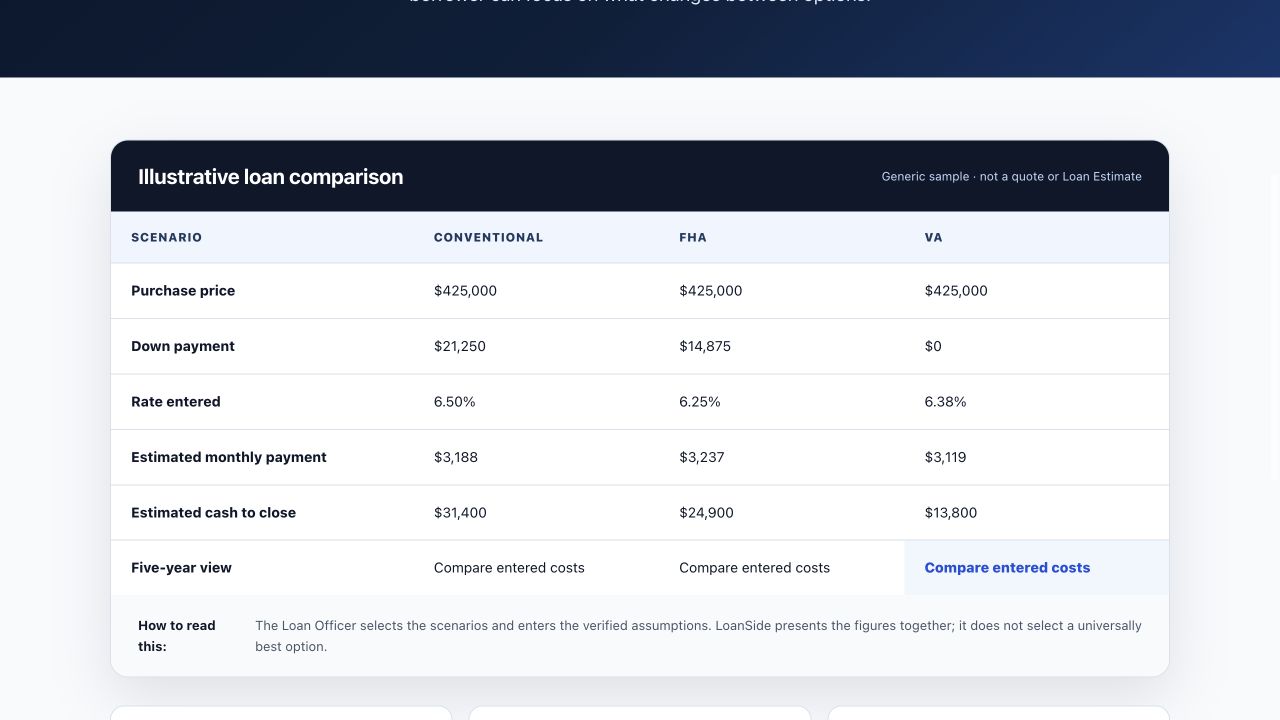
Compare homes or financing options across Conventional, FHA,
and VA. Show payment, mortgage insurance, estimated closing
costs, and cash to close in one clear view.
Review delayed mortgage-rate data, Treasury yields, rate
movement, and market commentary without bouncing between
multiple tabs before a client call.
🤖
Six mortgage-focused AI assistants
Use Rate Advisor, Loan Scenario Helper, Pre-Qual Estimator,
Objection Handler, FHA vs Conventional, and Client Email Writer.
Bring your own Anthropic, OpenAI, or Gemini API key; it stays in
your browser.
No per-query fees. Your API key never leaves your browser. AI tooling at marginal cost, not a $99/mo add-on.
💾
One organized workspace
Save comparisons, revisit client scenarios, manage property and
realtor records, personalize your profile and brand color, and
return to active work from one dashboard.
📱
Built to work where you do
Use LoanSide from your phone during showings or from your
desktop at the office. Shared comparisons open on any modern
device without requiring the client to create an account.
More than a comparison tool
Practical tools for the conversations around the deal.
LoanSide now includes purpose-built workspaces for loan officers
and Realtors—so the work before, during, and after a client
conversation stays organized.
Loan Officer Tools
Help borrowers understand their options.
Build branded home and loan strategy comparisons, create
pre-approval letters, estimate buying power or cash to close,
and prepare clear follow-up materials.
Prepare useful materials with a review step built in.
Use Marketplace Turbo for supported listing-draft workflows,
create editable listing promotion copy, and build open-house
materials while keeping the final review in human hands.
Many newer workflows support saved drafts for signed-in users,
and the organized workspaces help you quickly return to the
right tool for the task at hand.
Private account-saved drafts where availableSearchable, organized tool workspacesReview before sharing or publishing
One plan includes the complete LoanSide workspace.Start a 14-day trial and explore the tools that fit your
workflow.
LoanSide helps you explain tradeoffs, respond faster, and keep the
details behind each conversation easy to find.
Explain the numbersReplace spreadsheet screenshots with polished, branded
comparisons.
Promote listings fasterReduce repetitive Zillow-to-Marketplace transfer work with
Marketplace Turbo.
Follow through fasterCreate letters, share links, email clients, and print clean
PDFs.
Keep human controlReview estimates, AI output, and every Marketplace draft before
it is used.
From a LoanSide user
Built for the comparison conversation.
Loan officers use LoanSide to bring the important figures into one
client-ready view.
Names, roles, and companies are shared with permission.
“I use LoanSide to build side-by-side loan comparisons in minutes
instead of building them from scratch in a spreadsheet every time.
It's especially handy for showing a borrower FHA vs. conventional
vs. VA at a glance, with the numbers auto-calculated instead of me
double-checking my own math.”
“As a loan officer working closely with real estate agents, I need
to explain loan options clearly and fast. LoanSide gives me a
shareable comparison I can send to an agent or borrower on the
spot, instead of a back-and-forth over email with spreadsheet
attachments.”
“I use Marketplace Turbo to pull a Zillow listing straight into a
Facebook Marketplace ad instead of manually retyping details and
re-uploading photos one by one. What used to be 15–20 minutes of
copy-paste and photo saving now takes under a minute, and I can
get a new listing posted while it's still fresh instead of falling
behind.”
Secured by StripeCard details are handled by Stripe.
Current monthly prices: LoanSide $9.99 · MLO Engine from $59 · WealthLens from $99. Check each provider’s site for current offers.
Marketplace Turbo is live: v0.7.5 is publicly
available on the Chrome Web Store. Create your LoanSide account,
install the extension, and use the Marketplace workflow from
your workspace.
FAQ
Questions loan officers ask
LoanSide uses standard mortgage math for payment, mortgage insurance, and funding fees, with estimated closing costs. Figures are estimates for client education; verify final numbers with your LOS before lending decisions.
AI API keys are stored locally in your browser, not on LoanSide servers. Comparison links are shareable without client accounts, and LoanSide does not sell borrower data.
It creates a private property record and tracking code in
LoanSide, then uses the companion Chrome extension to read
supported Zillow listing details and prepare a Facebook
Marketplace draft. You review the result and publish manually.
No. Turbo does not click Next or Publish. Facebook can change
its form, and every listing should be checked. You remain in
control of the final review and publication.
No. A client can open the comparison link you share on a phone
or desktop without creating an account.
LoanSide currently supports Conventional, FHA, and VA scenarios,
including relevant mortgage-insurance or funding-fee
calculations and side-by-side payment and cash-to-close
estimates.
You connect your own Anthropic, OpenAI, or Google Gemini API
key. The key is stored locally in your browser rather than in
LoanSide’s servers. AI output should always be reviewed before
it is shared or used in a lending decision.
After the free trial, choose $9.99 per month or $99 per year
(save $20.88). You can cancel anytime, with no long-term contract.
Yes. Marketplace Turbo v0.7.5 is publicly available on the
Chrome Web Store. Install the extension and sign in to LoanSide
to use the Marketplace workflow.
Not currently. LoanSide is the client-ready comparison workspace,
not a replacement for your LOS. Verify final figures, disclosures,
and lending decisions in the systems your organization uses.
LoanSide does not claim a security certification. AI API keys stay
in your browser, Stripe handles payment card details, and LoanSide
should not replace the systems your organization approves for final
loan records and disclosures.
Turn the next property into a faster, clearer loan conversation
Compare, prepare, track, promote, and communicate from one LoanSide
workspace—with Marketplace Turbo available now on the Chrome Web
Store.